Design System Guidelines for POs
Introduction to the Design System 🎨
-
Definition: Design System (DS) is a collection of reusable components, tokens and icons.
-
Purpose and Benefits: Make our product-agnostic to brand visual identity and with so be able to accommodate several brands in it. Having this catalog of reusable components brings consistency, efficiency, and improved user experience within any brand. This opens a world of possibilities but it needs to be correctly maintained to work as expected.
Roles and Responsibilities 👥
-
PO’s Role: Ensuring the design system is being considered. Understand if there are more teams working on those components.
-
Team Developer's role: Free to do bumps/TBD integrations
-
Designer's role:
-
EM’s role:
-
Collaboration with Designers and Developers: POs should work with designers and developers, including regular check-ins to make sure everyone is aligned.
Governance and Tools 🏛️
DS Designers
DS Developers: Maintainers of The Wall, which means they are in in charge of The Wall releases and updating client’s version?
Tools information on tools used to manage the design system (e.g., Figma, Storybook) and how POs can access and utilize these tools.
-
Figma: hosts the specs for the components and tokens, these should be shared by the designer.
-
Storybook: library of components. Can be useful to know how each component works.
Lifecycle Important Steps 🔄
Validate/Plan Phase
-
When Product Designers are involved, there must also be a Design System Designer representative.
-
Check if there’s a need to raise tickets with DS Designers team:
-
If Product Designers aren’t able to reuse existing components on DS, they will need to uplift a component or create a brand-new one and raise the ticket. As UI designs are already being built they should be shared with a Design System dev to give their input as well.
-
If there are no tokens applied to a component, POs or PMs should raise the ticket.
-
-
Use a Delivery Tracking sheet (see below) and add a column with an expected date.

-
Design catch-ups (POs, Design, DS, EM) help to align deliverables and timelines between us, design and the design system.
-
After both Design teams are satisfied with the result, for designs sign-off would be needed with PO / PM / EM.
Plan Phase
-
Take tokenization work into consideration in estimates and your delivery plans.
-
Design catch-ups (POs, Design, DS, EM) help to align deliverables and timelines between us, design and the design system.
-
POs share a list of all the components that will need design system in their P2s initiatives and the timelines of when they'll need it to work on (plus raising design tickets for it). This can be shared on Confluence.
Build Phase
-
Dev teams can’t work at the same time on the same component, therefore. Devs must let other teams know they are picking a component.
-
Design can help organize work, if one team does all the work or if it’s iterative work by different teams
-
Recommend teams communicate to know when the component is free for the next team to work on it.
-
UAT must involve testing both Sky and Betfair web and apps - if the feature is or can be applied to both.
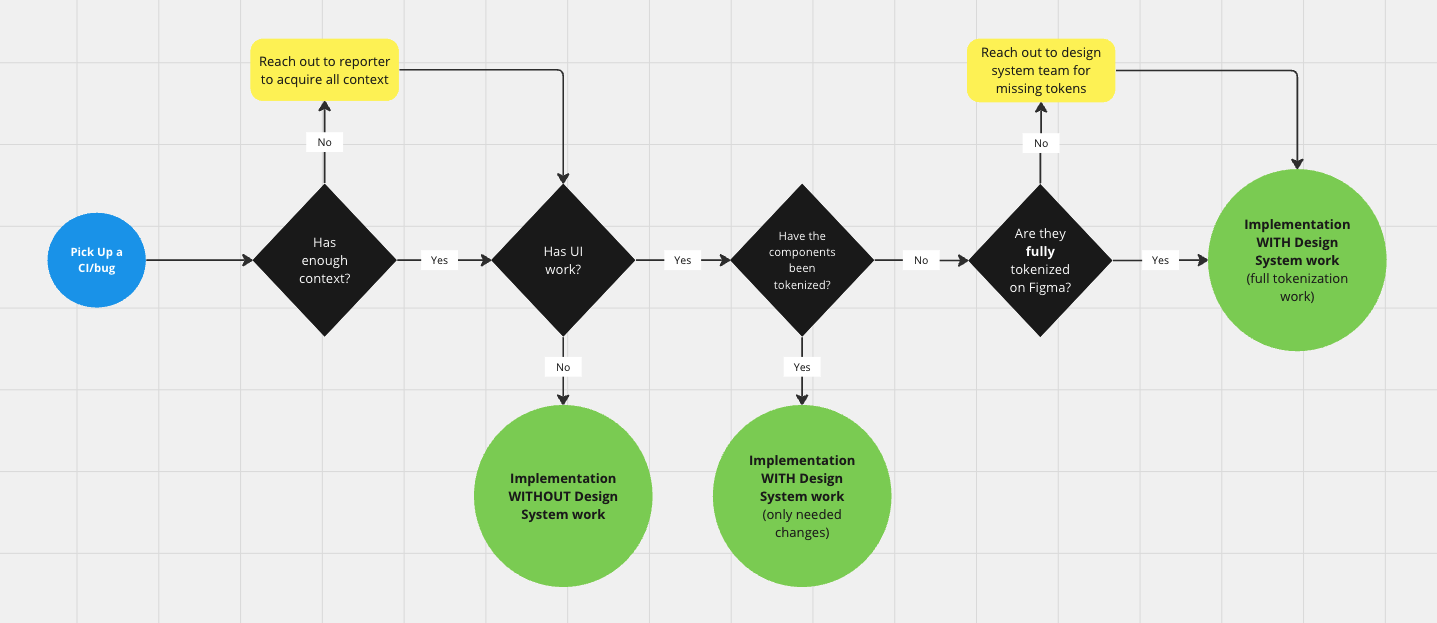
CI/Bugs and Design System 🛠️
How to reach us? 📥
For any queries regarding Design System, The Wall or in case you want to flag up anything you spot that looks different from what’s expected and help us identify it, please reach us out at #ask-the-wall.