Figma Variables — Core Concepts
Our Goal: Build a shared understanding of the building blocks behind variables and how they map to our design system, tokens and brands.
1. Tokens vs. Figma Variables
| Term | Definition | Where it Lives | Example From Our System |
|---|---|---|---|
| Design Token (TS) | The named decisions that define our design system — colors, typography, spacing, etc. Managed in Tokens Studio (TS). | Tokens JSON repo | gb.colours.blue.40 = #185FD8 |
| Figma Variable | The dynamic value designers use inside Figma to bind components to tokens. Generated from tokens via TS export. | Figma Variables panel | brand.color.action.bg → {gb.colours.blue.40} |
How they work together:
Tokens define what decisions exist → Variables are how we apply those decisions inside Figma
Tokens = source of truth
Variables = implementation layer
Flow:
> Tokens Studio → Figma Variables → Component Bindings → Code
2. Collections
Collections organize variables into layers of abstraction.
This structure matches how your tokens are divided in tokens.json
| Collection | Purpose | Example Variables |
|---|---|---|
| 00-Primitives | Core building blocks used by all brands (agnostic). | gb.colours.grey.10 = #F2F2F3 gb.spacing.16 = 16 |
| 10-Brand | Brand-specific overrides or aliases. | betfair.gb.font-family.font-primary = Noto Sans |
| 20-Product | Differences for individual products/apps. | sky.gb.colours.gradient.sbg-01 |
| 30-Platform | Platform-specific tokens like iOS, Android, Web. | platform.ios.spacing.16 |
| 40-Semantic | Meaningful tokens built from primitives. | sm.border-radius.medium = {gb.border-radius.4} |
3. Modes
Modes let you switch values instantly for different contexts.
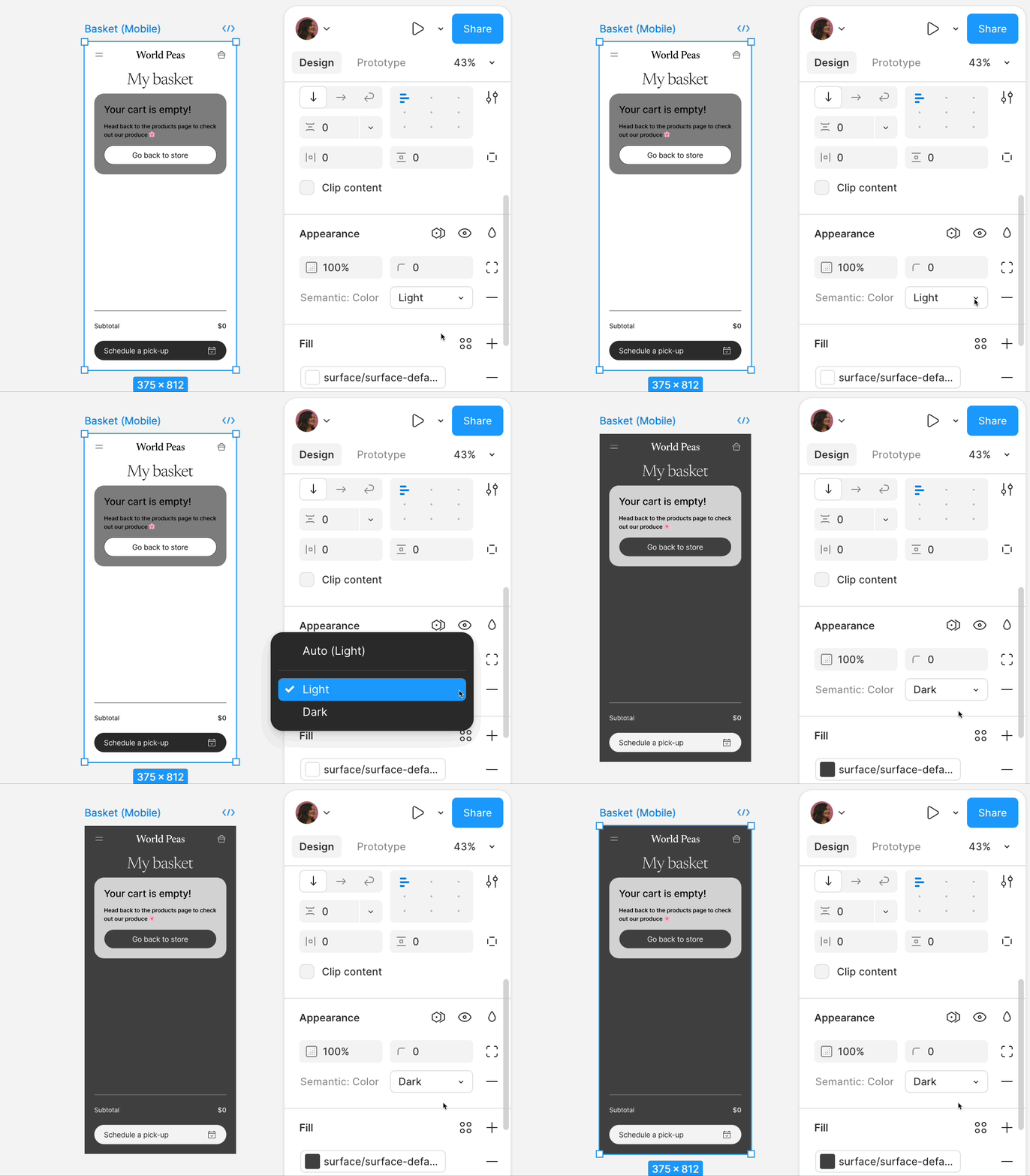
Examples from our token structure:
| Mode Context | Example Light Value | Example Dark Value |
|---|---|---|
| Light/Dark Theme | gb.colours.grey.5 = #FCFCFD | gb.colours.grey.110 = #18181A |
| Brand Switching | Betfair gb.font-family.font-primary = Noto Sans | Sky gb.font-family.font-primary = Sky Text |
| Transparency Variants | gb.colours.grey.037 = rgba(255,255,255,0.37) | gb.colours.grey.020 = rgba(255,255,255,0.2) |
4. Aliases
Aliases point to other variables, ensuring clean fallbacks and minimal duplication.
Why use aliases:
- Reduce duplication
- Make cascading updates safe
- Keep relationships clear (brand → primitive → component)
Example chain:
sm.border-radius.medium → gb.border-radius.4 → 4px
If the primitive gb.border-radius.4 changes, all semantic tokens referencing it update automatically.
5. Variable Types in Our System
Figma supports four variable types.
Each one has specific use cases in design.
| Type | Use Case | Real Example |
|---|---|---|
| Color | Palette, gradients, semantic color tokens | gb.colours.yellow.40 = #FFCE2E |
| Number | Spacing, sizing, border widths, opacity | gb.spacing.16 = 16 |
| Boolean | States for component variants | is.selected (future use case) |
| String | Font family names or states | gb.font-family.font-primary = Arial |
6. Fallback Logic
Fallbacks ensure nothing breaks when a value is missing.
- Start with Primitives (agnostic layer)
- Alias Brand variables to primitives by default
- Only override a brand or product variable when truly needed
Fallbacks guarantee consistent behavior:
> Primitives → Brand → Product → Platform → Semantic
Example:
- Primitive:
gb.colours.green.30 = #3EC141 - Brand:
pp.gb.colours.green.30(Paddy Power override if needed) - Product:
product.skybet.color.success = {pp.gb.colours.green.30}
If a value isn’t defined at the brand or product level, it falls back automatically to the lower layer.
7. Multi-Dimensional System
Our system supports multiple dimensions:
| Dimension | Example From File |
|---|---|
| Brand | Betfair → 00-global/betfair Sky → 00-global/sky Paddy Power → 00-global/pp |
| Mode | Light/Dark toggles like gb.colours.grey.5 vs. gb.colours.grey.110 |
| Platform | iOS, Android overrides (future growth) |
| Semantic Layer | sm.border-radius.medium → gb.border-radius.4 |
Multi‑dimensional model:
In TS, we model n‑dimensions.
In Figma, a collection can carry one or more mode sets. To stay readable, we map the most commonly switched dimensions (e.g., mode, brand) into modes, and we use collections + naming to represent the rest.
8. Example Cascades
Color Example: Betfair Button Background
**Primitive:** `gb.colours.blue.40 = #185FD8`
↓
**Brand:** `betfair.gb.colours.blue.40` → `{gb.colours.blue.40}`
↓
**Component:** `button.background` → `{betfair.gb.colours.blue.40}`
### Typography Example: Headings

**Primitive:** `gb.font-size.24 = 24px`
↓
**Semantic:** `sm.heading.large.strong.fontSize` → `{gb.font-size.24}`
↓
**Component:** `H1 text layer` → `{sm.heading.large.strong}`
9. Naming Patterns
All variables follow dot.case for clarity:
| Token Type | Pattern | Example |
|---|---|---|
| Color | gb.colours.<hue>.<value> | gb.colours.grey.10 |
| Font Families | gb.font-family.font-primary | Sky Text |
| Spacing | gb.spacing.<value> | gb.spacing.16 |
| Border Radius | gb.border-radius.<value> | gb.border-radius.8 |
| Semantic | sm.<category>.<sub-category> | sm.border-radius.medium |